What a fantastic Adsense revenue sharing site the owner of She Told Me has brought us now: Best Reviewer - a place to bookmark your own articles on other sites. There's no problems about linking to your articles elsewhere, pages of your blogs and sites, and, at the same time, you can earn from clicks on the Adsense ads on your pages on Best Review, if you have an Adsense account, and include your Adsense publisher id when joining Best Reviewer.
The top 3, top 5, top 10 and top 20 I refer to in the title of this post is about how you post your bookmarks on Best Reviewer. The minimum allowed per page is 3, and the maximum allowed is 20. It's a great idea to link to perhaps 5 of your articles on various sites, (each needing just a one line description) that all relate to the same topic. You have 5 bookmarks all on one page about a similar topic - creating better findability by search engines!
Oh, and did I mention that below each post of "Tops" that you make, the link to your website or blog (or article writing site profile, or social site profile) will automatically appear, if you included it when you signed up.
Also, when people sign up beneath you, using your referral link, and they post their own tops on Best Reviewer, beneath where their website or blog link appears on their pages, your website or blog link appears too!
Join Best Reviewer now, earn from clicks on your Adsense ads there, and get more traffic to your own content elsewhere.
Original article on, and © copyright Teresa Schultz 2010
Showing posts with label blog. Show all posts
Showing posts with label blog. Show all posts
Thursday, October 7, 2010


Sunday, August 1, 2010
The signing up process at You Say Too - an Adsense Revenue Sharing site
If anyone has read the about me on this blog, they'll see that I'm keen to make money blogging - even if takes me a really long time, as I can only spend time on it inbetween doing my other work - my work, along with my boyfriend Tony, is freelance web design and writing, from home. A lot of my paid writing or Internet research jobs come from oDesk, and that's cool, as I can work for anyone in the world. Most of my web designing jobs are local, here in East London - although have designed a few sites for people in other towns of South Africa too, mostly communicating via email. Have even helped redesign a site for an International client via oDesk, but, generally, the web design section of my work at home job is for local clients. The writing is from online efforts and earning from Google Adsense, or, as said already, from getting writing jobs on oDesk.
I haven't posted any new blog posts here in a while as I have been busy exploring some online income opportunities. I think I plan to discuss many of them on this blog, or on some of my other blogs, to help others who are thinking of doing the same, or who are wanting some tips, advice, reviews, or more information on the different extra income opportunities I come across. One of these is You Say Too.
As I write this I'm still sort of in the process of signing up - I find the site incredibly slow - but these are my views so far, and obviously probably related mostly to the sign up process:
By following some simple instructions on You Say Too you can feed your Blogger blog posts to the site. Be patient with the site if you find it slow too (I've just checked and it seems my blog (this one) is now there.) - as You Say Too seems a good place to earn a little extra income from the Adsense ads on the site.
If you have a Google Adsense account, you will earn 50% of the revenue that You Say Too makes. To get your posts or blogs on You Say Too seen more, get involved in the community there, make new friends, don't go against any of the TOS (terms of service/terms and conditions/rules), and update your main blog regularly. If you don't have a blog, you can make blog posts directly on the site - of course, remember to get some links to these blog posts by leaving the links to them on social sites or social bookmarking sites - or in other articles you have elsewhere on the Internet.
Now, if you couldn't care less about making some extra income for yourself, but you do care about charities trying to help the world, and you do have a blog you post to regularly, then submit your blog to You Say Too anyway, as part of the revenue from advertising on the site will then go to the charity of your choice instead of to you. You won't even have to join Google Adsense if you don't yet have an account there, as You Say Too will handle the earnings you would have earned through their own Adsense account and will donate it to the charity of your choice. I'm hardly signed up there, so haven't yet noticed if you are able to see on your dashboard how much you have earned that is donated to a charity, but I do suspect that you would be able to check.
Of course if you're pretty much struggling along yourself, then don't feel bad to rather choose that the earnings come to you instead of to a charity - as long as when you make it big one day, through your online activities, you remember to help out those less fortunate than yourself - people, animals, causes.
I've branched off the main topic here, so back to it - the signing up process:
Put up with the slow site (if it really is slow in general and not just me - but it seems much slower than other sites I've joined) as perhaps it will improve, and, besides, I've read some good reviews on You Say Too, on other sites.
Choose a user name and password - the user name space allowance is somewhat small - I usually add teresaschultz or Teresa Schultz as my user name, but could only fit in TeresaS on You Say Too.
Add your Wordpress.com or Blogger blog: type in the URL of your blog and the RSS feed. For Blogger the feed comes up automatically after typing in the URL - well mine did.
Add a code to your blog. Simply copy the coding that comes up and add a third party html gadget to your gadgets on your Blogger (not sure what the steps are for other blogging platforms.)
I first added it as a text gadget, as this is how I usually add buttons to my blogs (like the South African blog aggregator myScoop button), but it either didn't take immediately, or didn't work at all. Everything seems fine now that I started all over again (the adding the blog step) and added a third party html gadget instead.
There also seems to be a further exposure opportunity involving possibly placing a widget or box or advert on your site, that displays other people's blog posts (but theirs will display yours too) so, sort of a swopping and helping out set up - I will be checking this out too.
So, that's it for now about yousaytoo - updates and more extra income news, tips and advice coming soon.
There are already some tips and reviews about work at home jobs on my work at home jobs site, if you'd like to check those out too.
© copyright Teresa Schultz 2010
I haven't posted any new blog posts here in a while as I have been busy exploring some online income opportunities. I think I plan to discuss many of them on this blog, or on some of my other blogs, to help others who are thinking of doing the same, or who are wanting some tips, advice, reviews, or more information on the different extra income opportunities I come across. One of these is You Say Too.
As I write this I'm still sort of in the process of signing up - I find the site incredibly slow - but these are my views so far, and obviously probably related mostly to the sign up process:
By following some simple instructions on You Say Too you can feed your Blogger blog posts to the site. Be patient with the site if you find it slow too (I've just checked and it seems my blog (this one) is now there.) - as You Say Too seems a good place to earn a little extra income from the Adsense ads on the site.
If you have a Google Adsense account, you will earn 50% of the revenue that You Say Too makes. To get your posts or blogs on You Say Too seen more, get involved in the community there, make new friends, don't go against any of the TOS (terms of service/terms and conditions/rules), and update your main blog regularly. If you don't have a blog, you can make blog posts directly on the site - of course, remember to get some links to these blog posts by leaving the links to them on social sites or social bookmarking sites - or in other articles you have elsewhere on the Internet.
Now, if you couldn't care less about making some extra income for yourself, but you do care about charities trying to help the world, and you do have a blog you post to regularly, then submit your blog to You Say Too anyway, as part of the revenue from advertising on the site will then go to the charity of your choice instead of to you. You won't even have to join Google Adsense if you don't yet have an account there, as You Say Too will handle the earnings you would have earned through their own Adsense account and will donate it to the charity of your choice. I'm hardly signed up there, so haven't yet noticed if you are able to see on your dashboard how much you have earned that is donated to a charity, but I do suspect that you would be able to check.
Of course if you're pretty much struggling along yourself, then don't feel bad to rather choose that the earnings come to you instead of to a charity - as long as when you make it big one day, through your online activities, you remember to help out those less fortunate than yourself - people, animals, causes.
I've branched off the main topic here, so back to it - the signing up process:
Put up with the slow site (if it really is slow in general and not just me - but it seems much slower than other sites I've joined) as perhaps it will improve, and, besides, I've read some good reviews on You Say Too, on other sites.
Choose a user name and password - the user name space allowance is somewhat small - I usually add teresaschultz or Teresa Schultz as my user name, but could only fit in TeresaS on You Say Too.
Add your Wordpress.com or Blogger blog: type in the URL of your blog and the RSS feed. For Blogger the feed comes up automatically after typing in the URL - well mine did.
Add a code to your blog. Simply copy the coding that comes up and add a third party html gadget to your gadgets on your Blogger (not sure what the steps are for other blogging platforms.)
I first added it as a text gadget, as this is how I usually add buttons to my blogs (like the South African blog aggregator myScoop button), but it either didn't take immediately, or didn't work at all. Everything seems fine now that I started all over again (the adding the blog step) and added a third party html gadget instead.
There also seems to be a further exposure opportunity involving possibly placing a widget or box or advert on your site, that displays other people's blog posts (but theirs will display yours too) so, sort of a swopping and helping out set up - I will be checking this out too.
So, that's it for now about yousaytoo - updates and more extra income news, tips and advice coming soon.
There are already some tips and reviews about work at home jobs on my work at home jobs site, if you'd like to check those out too.
© copyright Teresa Schultz 2010
Sunday, June 6, 2010
The boys now have their own blogs too
Spent quite some time this afternoon setting up blogger blogs for the boys, with their help. They chose their own blog names (titles), and two widgets each for their blogs.
Zooty's blog is Screeching Falcon and Basti's blog is Lava Reflections.
They enjoyed looking for widgets to add to their blogs and they have made their first blog post.
Zooty plans to upload photos of his artwork, or digital art, tshirt designs, and describe the pictures. He will also sometimes just give news or write a little story or idea down.
Basti plans to upload photos, perhaps some photos of art, and his digital art or other designs, and describe the pictures. He too will also have news and stories etc.
They do not yet have their own Internet on their computer (I do not yet allow it, and we can't afford it right now), and I will copy and paste or upload for them, from what they do on their computer. Sometimes, if I'm not too busy, I'll let them sit at my computer and upload their stuff themselves.
Zooty has already made himself a little "business card" design, and will hand some cards out to friends at school, who will hopefully pop in at his blog and leave a comment or two.
© copyright Teresa Schultz 2010

Zooty's blog is Screeching Falcon and Basti's blog is Lava Reflections.
They enjoyed looking for widgets to add to their blogs and they have made their first blog post.
Zooty plans to upload photos of his artwork, or digital art, tshirt designs, and describe the pictures. He will also sometimes just give news or write a little story or idea down.
Basti plans to upload photos, perhaps some photos of art, and his digital art or other designs, and describe the pictures. He too will also have news and stories etc.
They do not yet have their own Internet on their computer (I do not yet allow it, and we can't afford it right now), and I will copy and paste or upload for them, from what they do on their computer. Sometimes, if I'm not too busy, I'll let them sit at my computer and upload their stuff themselves.
Zooty has already made himself a little "business card" design, and will hand some cards out to friends at school, who will hopefully pop in at his blog and leave a comment or two.
© copyright Teresa Schultz 2010
Sunday, May 16, 2010
We did it! 21 blog posts today!
Well, not quite today, as it's after midnight now, but still before going to bed, so, yes, we did it! Was a little tough for just the two of us, plus we popped out for nearly two hours to visit a friend earlier, so we're still pleased we managed to finish all the blog posts before going to sleep tonight (this morning?)
These are the 21 blog posts we managed today (and this one is actually 22 then!)
On this blog just see the four previous posts before this one:
blog posts target for the two of us today: 21
Living at Granny
Let's see those teeth
On Tony Flanigan blog:
Wordpress on Blogger?
VIVA WC 2010!
Wordpress. Step by step for beginners, part 6
On East London Photographs and Wild Ramblings:
The sun rises and slips behind clouds
Shell and rocks looks like a chameleon's head and eye
Yacht mooring ropes and metal bollard
Spot the bus car train and boat
Looking at yachts on the Buffalo River in East London
On Work at Home Jobs:
Extra income from fruit and vegetable deliveries and sales
Determining your selling price of homemade pickled onions
Make and sell custom chess sets for extra income
TnT Unleashed 1pic4twenty:
Other ways to beat writer’s block and write for SEO
Website design and take-aways
Monetizing your website or blog
Clay Brick:
Living a natural life
Straw bale houses
A little clay duck
Ok! There you go! There we go! No more blog posts tonight, it's 2.15 in the morning. Now it's time to let our heads hit pillows between bed posts!
© copyright Teresa Schultz 2010
These are the 21 blog posts we managed today (and this one is actually 22 then!)
On this blog just see the four previous posts before this one:
blog posts target for the two of us today: 21
Living at Granny
Let's see those teeth
On Tony Flanigan blog:
Wordpress on Blogger?
VIVA WC 2010!
Wordpress. Step by step for beginners, part 6
On East London Photographs and Wild Ramblings:
The sun rises and slips behind clouds
Shell and rocks looks like a chameleon's head and eye
Yacht mooring ropes and metal bollard
Spot the bus car train and boat
Looking at yachts on the Buffalo River in East London
On Work at Home Jobs:
Extra income from fruit and vegetable deliveries and sales
Determining your selling price of homemade pickled onions
Make and sell custom chess sets for extra income
TnT Unleashed 1pic4twenty:
Other ways to beat writer’s block and write for SEO
Website design and take-aways
Monetizing your website or blog
Clay Brick:
Living a natural life
Straw bale houses
A little clay duck
Ok! There you go! There we go! No more blog posts tonight, it's 2.15 in the morning. Now it's time to let our heads hit pillows between bed posts!
© copyright Teresa Schultz 2010
Saturday, May 15, 2010
blog posts target for the two of us today: 21
Hope we can manage it. We've written down the amount of posts each of our blogs should get today, and although we'd like to aim at even more than 21, 21 is our immediate aim. I think we might be able to do it. We're hoping this effort we are going to put in today will give us and our services a little more exposure (see previous post we have money to last about 4 days)
It's drizzling out, and is a perfect day for writing plenty.
Where are we planning on posting our 21 blog posts (which of our current 6 blogs?)
Well, it would be nice to put all 21 on just one blog, as that would make a nice difference in its ranking on myScoop, which we are big fans of, but, to keep our other blogs either stable there, or keep them rising in the ranks, we can't neglect them for too long. Trying to do well on myScoop definitely encourages one to write more! See this post about why we would like to try do well on myScoop.
The blogs we're going to try add 21 posts to today, and how many for each:
Tony Flanigan personal blog - at least 3 blog posts - written by Tony
Teresa Schultz personal blog (this blog) - at least 4 blog posts - written by me (with this post it's one down, three to go)
East London Photographs and Wild Ramblings - at least 5 - photos uploaded and written by me
TnT Unleashed 1pic4twenty - at least 3 - written by either of us - this blog has the best overall ranking, of our 6 on myScoop, at the moment.
Work at Home Jobs - at least 3 - written by either of us
Clay Brick - at least 3 blog posts, perhaps embed a Youtube video or two - written by either of us
Well, I best move on, then!
© copyright Teresa Schultz 2010
It's drizzling out, and is a perfect day for writing plenty.
Where are we planning on posting our 21 blog posts (which of our current 6 blogs?)
Well, it would be nice to put all 21 on just one blog, as that would make a nice difference in its ranking on myScoop, which we are big fans of, but, to keep our other blogs either stable there, or keep them rising in the ranks, we can't neglect them for too long. Trying to do well on myScoop definitely encourages one to write more! See this post about why we would like to try do well on myScoop.
The blogs we're going to try add 21 posts to today, and how many for each:
Tony Flanigan personal blog - at least 3 blog posts - written by Tony
Teresa Schultz personal blog (this blog) - at least 4 blog posts - written by me (with this post it's one down, three to go)
East London Photographs and Wild Ramblings - at least 5 - photos uploaded and written by me
TnT Unleashed 1pic4twenty - at least 3 - written by either of us - this blog has the best overall ranking, of our 6 on myScoop, at the moment.
Work at Home Jobs - at least 3 - written by either of us
Clay Brick - at least 3 blog posts, perhaps embed a Youtube video or two - written by either of us
Well, I best move on, then!
© copyright Teresa Schultz 2010
Tuesday, May 11, 2010
Oh my word I'm so blonde! - or still such a newbie blogger!
myScoop - the South African blog aggregator - is just blowing me away, AGAIN! Posted an article on one of my blogs about a Round Tuit less than an hour ago, then was on Google.co.za to show Tony what other Round Tuits look like, (typed in only two words: Round Tuit) and over 30 000 search results came up, and hey, there on page one (in the first ten results) was a link to myScoop with my blog title! Clicked it, brought me to myScoop and the title and first few words of my article, with another link there saying "Go to this article" and clicking that took me to my blog post! I didn't know myScoop did this.
myScoop is powerful. I almost wish it was my own little secret, but I'm a nice person, so I'm sharing this. All SA bloggers should join myScoop, and gain more exposure for their blogs and blog articles. Easy peasy.
© copyright Teresa Schultz 2010
myScoop is powerful. I almost wish it was my own little secret, but I'm a nice person, so I'm sharing this. All SA bloggers should join myScoop, and gain more exposure for their blogs and blog articles. Easy peasy.
© copyright Teresa Schultz 2010
myScoop, and There ARE nice guys in South Africa
When we hit a glitch with our websites, we call on Collin, our web hosting guy. Collin's brilliant. He's helpful, and quick to help sort out our problems. Tony and I can be a bit blonde, at times, but Collin doesn't mind - or is quiet about us being blonde - and is forever patient, and just a great big help. This is much appreciated.
Nicholas Duncan, founder and creator of the South African blog aggregator myScoop, is another nice guy.
Tony (another nice South African guy - my boyfriend!) and I joined myScoop about a week ago (added our blogs to myScoop) and we're really enjoying it there - easy to use and fun to see how one's blog is rated against the other members' blogs. myScoop uses real-time to allow a bookmark of one's latest blog posts to immediately just pop up on myScoop. Blogs drop or rise every day in the listings.
I was really pleased to recently see two of my four blogs listed there make the top five on the "Today's top risers" list - so was inspired to write a few more posts for some of my blogs, only to be quite upset when the bookmark for two of them did not immediately appear, as before, and as my other blog posts still were.
At first, I thought it was just a little glitch, that would sort itself out soon, but was worrying about ending up looking like I was one of the "Today's top fallers" so contacted Nicholas Duncan via email.
With a bit of advice from our hosting guy, Collin, we managed to sort it all out, and the bug is fixed! Nicholas worked hard at sorting it out, and communicated throughout, and, well, isn't that nice? How many International site owners do you sometimes wait forever to hear back from? This was all sorted in next to no time. Local is lekker.
myScoop is "South Africa's Real-Time Blog Aggregator and Blogging Community"
If you are experiencing any bugs or problems related to myScoop, don't just keep mum about it, or leave myScoop. Help Nick Duncan make myScoop as best as it can be for all, by contacting him and letting him know.
Oh? You're a South African blogger and haven't yet joined myScoop? Um, well, gee, that's a bit silly. Get to it!
© copyright Teresa Schultz 2010
Nicholas Duncan, founder and creator of the South African blog aggregator myScoop, is another nice guy.
Tony (another nice South African guy - my boyfriend!) and I joined myScoop about a week ago (added our blogs to myScoop) and we're really enjoying it there - easy to use and fun to see how one's blog is rated against the other members' blogs. myScoop uses real-time to allow a bookmark of one's latest blog posts to immediately just pop up on myScoop. Blogs drop or rise every day in the listings.
I was really pleased to recently see two of my four blogs listed there make the top five on the "Today's top risers" list - so was inspired to write a few more posts for some of my blogs, only to be quite upset when the bookmark for two of them did not immediately appear, as before, and as my other blog posts still were.
At first, I thought it was just a little glitch, that would sort itself out soon, but was worrying about ending up looking like I was one of the "Today's top fallers" so contacted Nicholas Duncan via email.
With a bit of advice from our hosting guy, Collin, we managed to sort it all out, and the bug is fixed! Nicholas worked hard at sorting it out, and communicated throughout, and, well, isn't that nice? How many International site owners do you sometimes wait forever to hear back from? This was all sorted in next to no time. Local is lekker.
myScoop is "South Africa's Real-Time Blog Aggregator and Blogging Community"
If you are experiencing any bugs or problems related to myScoop, don't just keep mum about it, or leave myScoop. Help Nick Duncan make myScoop as best as it can be for all, by contacting him and letting him know.
Oh? You're a South African blogger and haven't yet joined myScoop? Um, well, gee, that's a bit silly. Get to it!
© copyright Teresa Schultz 2010
Saturday, May 8, 2010
My blog's Active Rate on myScoop dead?
My Active Rate (on myScoop) shows as dead for this blog - which sounds absolutely awful! I do "get it" though - I think. Although I added 4 posts to this blog yesterday, I just joined (added my blog to myScoop) a few minutes ago, so I guess it will sort itself out soon - like maybe now? (now that I'm adding this post lol!)
About two weeks ago I added my blogs to Afrigator, and it's great but the competition is pretty fierce, hey! So, am trying another South African blog aggregator too - myScoop. I also have one of my blogs on the blog aggregator Amatomu, and should add my other current three there too. Time, time, time - goes nowhere, lol. I need a big fat round tuit (get-around-to-it) in front of my face all the time!
These South African blog aggregators - myScoop, Afrigator, and Amatomu - are fun - it's great to see how one's blog measures up against other SA blogs, and it encourages blog owners (bloggers!) to post post post to their blogs. Nice one, SA!
© copyright Teresa Schultz 2010
About two weeks ago I added my blogs to Afrigator, and it's great but the competition is pretty fierce, hey! So, am trying another South African blog aggregator too - myScoop. I also have one of my blogs on the blog aggregator Amatomu, and should add my other current three there too. Time, time, time - goes nowhere, lol. I need a big fat round tuit (get-around-to-it) in front of my face all the time!
These South African blog aggregators - myScoop, Afrigator, and Amatomu - are fun - it's great to see how one's blog measures up against other SA blogs, and it encourages blog owners (bloggers!) to post post post to their blogs. Nice one, SA!
© copyright Teresa Schultz 2010
Tuesday, May 4, 2010
How about blog comments as a birthday gift service?
I'm forever dreaming up different ways to make money, not just for myself, but for my visitors to my different sites too - and since my birthday is coming up in two days' time, it got me thinking about gifts, and blogging - although blogging is something I think about a great deal more than birthdays.
When thinking of what to buy others for their birthdays, I usually think of what I myself would like if I was that person, and that's what I buy, or create, or make, or organize. I usually have to know the person quite well to get it right.
Now, for myself, I was thinking, what gift would I like? And would others also like what I like? Oh, I love hats and scarves, and chocolate, if I'm thinking of items as gifts, but I also like blogging, and working from home as a freelancer. I also like trying to give others ideas as to what they can do to make money from home.
My blogs are all still relatively new - and, so many people out there like the idea of blogging, but also have new-ish sites, - and hardly any comments - it's really exciting for newbies to get those first few comments, and even for the not so new bloggers to get plenty of comments. Decent comments - thoughts and input, not just "nice blog, I subscribed."
Knowing how much it can please people to get decent comments on their blogs, I should think about offering a birthday gift service to friends and family of active or new and excited bloggers - I would get paid to leave comments on a person's blog - look through the posts, read through them, understand them, and then leave a suitable and related nice comment - often geared towards seo for that person too, so that they would be really pleased with the comment.
Others that are great at leaving welcome and interesting blog comments should think of offering a birthday gift blogging service too. Or, if you're generally just a great listener, enjoy reading, and are friendly, think of it as a work from home opportunity to look into a bit more.
I know that, I, for one, would love to receive a birthday gift of some nice comments on my blog posts on my actual birthday, and know that it was a gift from somebody who understood what I liked, and wasn't able to do the commenting himself or herself. So, I should think about what I enjoy possibly being something that others could enjoy too, and I should offer the service. I (or you, if you are thinking of doing this too) could sell different packages eg 5 comments, 10 comments, 20 comments! Then there could also be sub category packages to choose from related to how many words I should write eg minimum 50 words, minimum 100 words, minimum 200 words etc!
Tony and I do already offer a blog commenting service, but hadn't yet thought of marketing it as a birthday gift service. (so here's the first step towards that idea!)
If you're a keen blogger, and it's your birthday today, I hope you have a super birthday, and that your blog or blogs get loads of comments today. HAPPY BIRTHDAY!
© copyright Teresa Schultz 2010
When thinking of what to buy others for their birthdays, I usually think of what I myself would like if I was that person, and that's what I buy, or create, or make, or organize. I usually have to know the person quite well to get it right.
Now, for myself, I was thinking, what gift would I like? And would others also like what I like? Oh, I love hats and scarves, and chocolate, if I'm thinking of items as gifts, but I also like blogging, and working from home as a freelancer. I also like trying to give others ideas as to what they can do to make money from home.
My blogs are all still relatively new - and, so many people out there like the idea of blogging, but also have new-ish sites, - and hardly any comments - it's really exciting for newbies to get those first few comments, and even for the not so new bloggers to get plenty of comments. Decent comments - thoughts and input, not just "nice blog, I subscribed."
Knowing how much it can please people to get decent comments on their blogs, I should think about offering a birthday gift service to friends and family of active or new and excited bloggers - I would get paid to leave comments on a person's blog - look through the posts, read through them, understand them, and then leave a suitable and related nice comment - often geared towards seo for that person too, so that they would be really pleased with the comment.
Others that are great at leaving welcome and interesting blog comments should think of offering a birthday gift blogging service too. Or, if you're generally just a great listener, enjoy reading, and are friendly, think of it as a work from home opportunity to look into a bit more.
I know that, I, for one, would love to receive a birthday gift of some nice comments on my blog posts on my actual birthday, and know that it was a gift from somebody who understood what I liked, and wasn't able to do the commenting himself or herself. So, I should think about what I enjoy possibly being something that others could enjoy too, and I should offer the service. I (or you, if you are thinking of doing this too) could sell different packages eg 5 comments, 10 comments, 20 comments! Then there could also be sub category packages to choose from related to how many words I should write eg minimum 50 words, minimum 100 words, minimum 200 words etc!
Tony and I do already offer a blog commenting service, but hadn't yet thought of marketing it as a birthday gift service. (so here's the first step towards that idea!)
If you're a keen blogger, and it's your birthday today, I hope you have a super birthday, and that your blog or blogs get loads of comments today. HAPPY BIRTHDAY!
© copyright Teresa Schultz 2010
Wednesday, April 28, 2010
Afrigator is only showing my boyfriend's recent blog posts, not mine.
I'm quite upset - it's probably just something I'm overlooking, but I'm still upset. Maybe one needs three posts on a new blog first or something?
I registered one of my other blogs with Afrigator (an SA blog aggregator) a few days ago, and it's wonderful to log in and see my stats for the past seven days, and to see how my blog is ranking in South Africa and Africa. So, I decided to register two more of my blogs, another one, and this one I am on right now (and you are reading), earlier today. Tony registered his personal blog today too, the first time he registered a blog on Afrigator.
Earlier this evening Tony posted a new article (his third on his new blog), and voila, there it immediately appeared in the list of recent posts on Afrigator ( a title, a link, and a brief summary). I posted a new article (my second one on this blog, as this one here is my third) a few minutes after Tony posted his (also on a free blogspot.com blog like this one), and ... nothing.
This reminds me that yesterday or the day before I was looking for my Wordpress blog's recent posting on Afrigator and couldn't find it. I assumed just because I'm still new there, but Tony is even newer. Tony and I have since discovered (on Afrigator) that paid-for Wordpress blogs have to have a PuSHPress plugin to enable the posts to be tracked in realtime, instead of only roughly two hours later. But I coudn't find my Wordpress post for a good few hours after I posted it.
But the free blogspot.com blogs and the free wordpress.com blogs' posts are supposed to be tracked straight away. Not mine. Yet.
Hopefully third time lucky, with this post being my third!
If no luck, I guess will keep looking through the Afrigator site for answers, or will have to email them and ask for clarity. Don't get it though, as Tony registered just the same as I did, and all is fine with his postings being tracked right away.
UPDATE Thursday 29 April 2010:
I eventually emailed Afrigator support, (late last night after 11pm) and had a reply before 8 this morning! Thank you Stii Pretorius of Afrigator! He's looking into the problem and is in communication with me via email, and is very helpful and polite. I'm glad it's going to be sorted, and also glad to have found out that I can actually just ping my latest posts myself if I'm in a super hurry to get them onto the latest posts lists on the homepage. Cool!
© copyright Teresa Schultz 2010
I registered one of my other blogs with Afrigator (an SA blog aggregator) a few days ago, and it's wonderful to log in and see my stats for the past seven days, and to see how my blog is ranking in South Africa and Africa. So, I decided to register two more of my blogs, another one, and this one I am on right now (and you are reading), earlier today. Tony registered his personal blog today too, the first time he registered a blog on Afrigator.
Earlier this evening Tony posted a new article (his third on his new blog), and voila, there it immediately appeared in the list of recent posts on Afrigator ( a title, a link, and a brief summary). I posted a new article (my second one on this blog, as this one here is my third) a few minutes after Tony posted his (also on a free blogspot.com blog like this one), and ... nothing.
This reminds me that yesterday or the day before I was looking for my Wordpress blog's recent posting on Afrigator and couldn't find it. I assumed just because I'm still new there, but Tony is even newer. Tony and I have since discovered (on Afrigator) that paid-for Wordpress blogs have to have a PuSHPress plugin to enable the posts to be tracked in realtime, instead of only roughly two hours later. But I coudn't find my Wordpress post for a good few hours after I posted it.
But the free blogspot.com blogs and the free wordpress.com blogs' posts are supposed to be tracked straight away. Not mine. Yet.
Hopefully third time lucky, with this post being my third!
If no luck, I guess will keep looking through the Afrigator site for answers, or will have to email them and ask for clarity. Don't get it though, as Tony registered just the same as I did, and all is fine with his postings being tracked right away.
UPDATE Thursday 29 April 2010:
I eventually emailed Afrigator support, (late last night after 11pm) and had a reply before 8 this morning! Thank you Stii Pretorius of Afrigator! He's looking into the problem and is in communication with me via email, and is very helpful and polite. I'm glad it's going to be sorted, and also glad to have found out that I can actually just ping my latest posts myself if I'm in a super hurry to get them onto the latest posts lists on the homepage. Cool!
© copyright Teresa Schultz 2010
How to customise the header banner of your Blogger blogspot blog like I just did
I was thinking about leaving my header banner plain, with just a bit of text description about what this blog is about (this is only my second post on this blog), but decided to spice it up a bit. I'm still learning so much about blogs and blogging as I go along, but I'm really pleased that my free Blogger template can be somewhat customised. The free Blogger theme for my blog is the first of the four rounders themes on offer.
I clicked layout and then, on the widgets page in my dashboard, went to the header area at the top to click edit. I chose to upload an image from my computer, and chose the option to allow my image to load behind my text (Placement: "Behind title and description").
Clicked save, and went to look at my new page. Oops, had a huge image there, could hardly see the white text of the blog title and description over it, and the image was off to the left mostly. Looking at it, I decided I quite liked the rather large image ( I may change the image later, and from time to time, and possibly use not-so-large ones, but the one I'm speaking about at the moment is a picture of a huge wave crashing onto sand (see more pictures taken at that beach spot on the same day) - hm, just thought, if I change it later, information I have planned for further down in this post won't make sense, so I guess I should upload it here too), but I wanted it centred, filling up the whole background space, other than a slight border at the ends. What I did like to see, at least, is that my picture was not distorted, the background Blogger panel just moved down with it, leaving a little border at the bottom and at the left (and a too-big border on the right).
So, needed to do some maths and measuring. (oh dear!) ("Tony, heeeelp pleeeease!")
Tony to the rescue. Tony did some measuring for me, using a Firefox add-on. Get it here (free). We needed to determine the width of the background panel. If you are using the same theme that I am, well, I can save you some time, as the width decided for my image of the wave, is 710 pixels. That leaves a thin little border of the natural blog's panel colour showing through at the sides of the image (and at the bottom of the image.)
We only had to worry about the width of the image, as the height would just push the background panel down behind it, keeping the background panel (with narrow borders at the sides and bottom) nicely in place.
We also needed to determine how much space my description above the image was taking up. We wanted to add the colour of the panel to the top of my image (and save it as a new image), so that the white writing would be clearly visible on it, instead of camouflaged on the image.
One can get the exact colour of part of a website page by taking a screenshot of the page, saving the image as a .jpeg and opening it in Photoshop to use a colour picker. Or one can use an application like Color Scheme Designer 1.0b (free.)
A height of 130 pixels was needed for the blog’s title and description. I added it onto the top of my wave picture, in Photoshop (after Tony told me the measurements for the top area – 130 x 710) and then saved the new image. This was done by opening a new file 130 pixels higher than the wave picture, then the wave picture was copy and pasted onto this blank image – the sides and bottom fitted snugly (the border around them on the blog appears automatically, using the measurements I did), and the top area was filled in with the background colour (#445566)
Deleted the “mistake” image on the blog by simply clicking “remove” in the header edit area of my dashboard, and then uploaded the new one – it looked great!

But, being me, I wanted it to look even better, and a little more personal.
I decided that I’d like to see people (myself, Tony, and my sons) directly beneath the blog title and description, before (above) the top of the wave image.
I already knew the width of a new file I wanted to create in Photoshop (710 pixels) and knew that the height of the description text area was 130 pixels. I knew I wanted my “people banner” a bit taller than my description area, so just decided to make it 180 pixels.
So now had to create a new background “file/image” for all three “banners” –
The height of my wave image, the height of my description area, as well as the height of my new, planned “people banner.”
I made my people banner separately, placed the wave image at the bottom of the file waiting for it, placed the description area at the top of that same file waiting for it, and placed my new people banner between them (all fitting snugly onto the file/background in Photoshop.)

I saved the new image, and will use it as my template when deciding on different images for it later.
I opened it up in Photoshop again, and saved it with a different name (actually just put the word “fun” at the end), and then messed about a bit in Photoshop, having that fun I mentioned, using the colour picker, text, and a splattery kind of brush tool.

Then loaded my image and I had a customized Blogger header banner!
UPDATE: I've since changed the theme of my Blogger blog - the image I used as a header banner in my old theme appears at the bottom of every page on this blog.
© copyright Teresa Schultz 2010
I clicked layout and then, on the widgets page in my dashboard, went to the header area at the top to click edit. I chose to upload an image from my computer, and chose the option to allow my image to load behind my text (Placement: "Behind title and description").
Clicked save, and went to look at my new page. Oops, had a huge image there, could hardly see the white text of the blog title and description over it, and the image was off to the left mostly. Looking at it, I decided I quite liked the rather large image ( I may change the image later, and from time to time, and possibly use not-so-large ones, but the one I'm speaking about at the moment is a picture of a huge wave crashing onto sand (see more pictures taken at that beach spot on the same day) - hm, just thought, if I change it later, information I have planned for further down in this post won't make sense, so I guess I should upload it here too), but I wanted it centred, filling up the whole background space, other than a slight border at the ends. What I did like to see, at least, is that my picture was not distorted, the background Blogger panel just moved down with it, leaving a little border at the bottom and at the left (and a too-big border on the right).
So, needed to do some maths and measuring. (oh dear!) ("Tony, heeeelp pleeeease!")
Tony to the rescue. Tony did some measuring for me, using a Firefox add-on. Get it here (free). We needed to determine the width of the background panel. If you are using the same theme that I am, well, I can save you some time, as the width decided for my image of the wave, is 710 pixels. That leaves a thin little border of the natural blog's panel colour showing through at the sides of the image (and at the bottom of the image.)
We only had to worry about the width of the image, as the height would just push the background panel down behind it, keeping the background panel (with narrow borders at the sides and bottom) nicely in place.
We also needed to determine how much space my description above the image was taking up. We wanted to add the colour of the panel to the top of my image (and save it as a new image), so that the white writing would be clearly visible on it, instead of camouflaged on the image.
One can get the exact colour of part of a website page by taking a screenshot of the page, saving the image as a .jpeg and opening it in Photoshop to use a colour picker. Or one can use an application like Color Scheme Designer 1.0b (free.)
A height of 130 pixels was needed for the blog’s title and description. I added it onto the top of my wave picture, in Photoshop (after Tony told me the measurements for the top area – 130 x 710) and then saved the new image. This was done by opening a new file 130 pixels higher than the wave picture, then the wave picture was copy and pasted onto this blank image – the sides and bottom fitted snugly (the border around them on the blog appears automatically, using the measurements I did), and the top area was filled in with the background colour (#445566)
Deleted the “mistake” image on the blog by simply clicking “remove” in the header edit area of my dashboard, and then uploaded the new one – it looked great!

But, being me, I wanted it to look even better, and a little more personal.
I decided that I’d like to see people (myself, Tony, and my sons) directly beneath the blog title and description, before (above) the top of the wave image.
I already knew the width of a new file I wanted to create in Photoshop (710 pixels) and knew that the height of the description text area was 130 pixels. I knew I wanted my “people banner” a bit taller than my description area, so just decided to make it 180 pixels.
So now had to create a new background “file/image” for all three “banners” –
The height of my wave image, the height of my description area, as well as the height of my new, planned “people banner.”
I made my people banner separately, placed the wave image at the bottom of the file waiting for it, placed the description area at the top of that same file waiting for it, and placed my new people banner between them (all fitting snugly onto the file/background in Photoshop.)
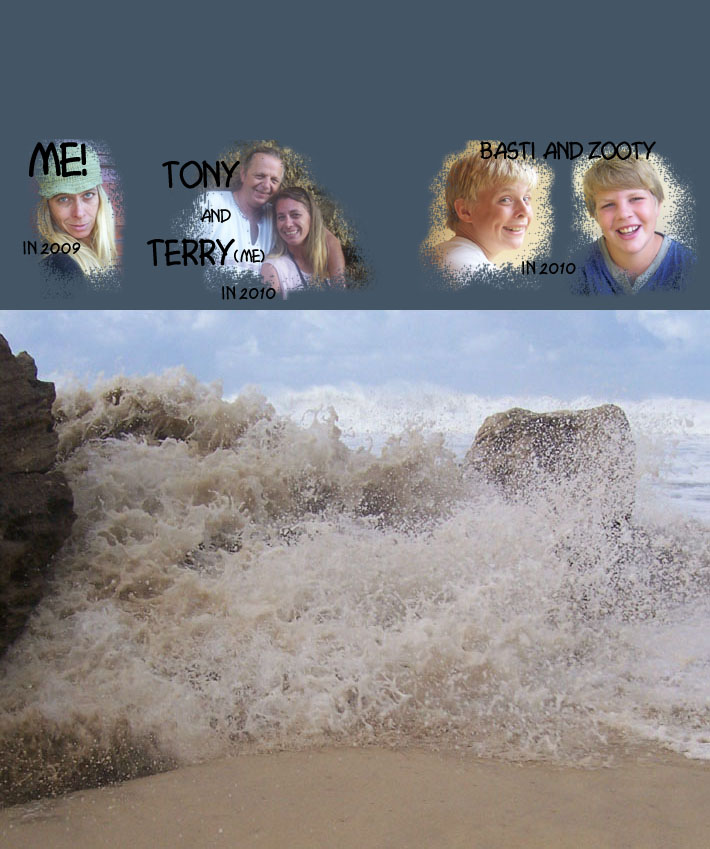
I saved the new image, and will use it as my template when deciding on different images for it later.
I opened it up in Photoshop again, and saved it with a different name (actually just put the word “fun” at the end), and then messed about a bit in Photoshop, having that fun I mentioned, using the colour picker, text, and a splattery kind of brush tool.

Then loaded my image and I had a customized Blogger header banner!
UPDATE: I've since changed the theme of my Blogger blog - the image I used as a header banner in my old theme appears at the bottom of every page on this blog.
© copyright Teresa Schultz 2010
My first post but not my first blog
Hello visitors! And hopefully old and current friends and aquaintances, and future friends and aquaintances! Yes I do use exclamations a lot, and will try calm down with that a bit, okay? (!)
Well, here I am with yet another blog, and I was thinking why not one with my own name as the title - so here it is and please enjoy it!
I like to write, and hopefully you'll enjoy what goes on in this head of mine, and the accounts of my everyday life.
Welcome to my world, grab a cup of tea or coffee - or something stronger if you like, and stay a while. Enjoy!
Teresa Schultz, East London, South Africa
Well, here I am with yet another blog, and I was thinking why not one with my own name as the title - so here it is and please enjoy it!
I like to write, and hopefully you'll enjoy what goes on in this head of mine, and the accounts of my everyday life.
Welcome to my world, grab a cup of tea or coffee - or something stronger if you like, and stay a while. Enjoy!
Teresa Schultz, East London, South Africa
Subscribe to:
Posts (Atom)